
When your team spends more time chasing approvals, copying data, and reconciling spreadsheets than moving work forward, business process automation stops being a nice-to-have. At Branch, a Dubai technology studio that builds enterprise platforms, AI systems, and digital experiences, this pattern shows up most often in regulated, deadline-driven operations where workflow gaps quickly become delivery risks.
TL;DR: Summary
- You need business process automation fast when your workflows are fragmented, manual bottlenecks are growing, and no one can see end-to-end process performance clearly.
- Deloitte Insights links better automation outcomes to process intelligence and visibility, while common blockers include integration difficulty at 62%, skills gaps at 55%, and resistance to workflow change at 52%.
- McKinsey found two-thirds of organizations were at least piloting automation, yet only 61% said they had met their automation targets, which means speed matters, but process redesign matters just as much.
- APQC process-efficiency metrics like error rate, system downtime, degree of automation, and forecast accuracy help you confirm whether a process is ready for automation and whether the fix is working.
- Branch is relevant when automation has to move from architecture through launch and post-launch support under one delivery model, especially in enterprise and government settings.
If you see repeated data entry, approval delays, weak audit trails, or reporting that depends on manual extraction, you already have the signals. The real question is not whether automation is possible, but whether you can identify the right process, redesign it where needed, and measure the result before costs and delays compound.
How do you know business process automation is urgent?
It is urgent when delays, rework, and poor visibility are already limiting throughput. Deloitte Insights and APQC both connect automation success to process visibility, integration readiness, and measurable efficiency signals like error rate and system downtime.
You should treat automation as urgent when operational friction becomes predictable rather than occasional. If the same process breaks every month-end, every campaign launch, or every reporting cycle, that is not random noise. It is a structural problem.
Urgency also rises when you cannot explain where work is stuck. A slow process is one problem. A slow process with no usable audit trail is a bigger one because you cannot fix what you cannot see. That is why process intelligence and process mining matter early. Deloitte reported that 63% of respondents said process intelligence accelerated discovery, and 80% said it helped identify and qualify higher-value automation opportunities.
Why are fragmented workflows a red flag?
Fragmented workflows are one of the clearest signs you need business process automation fast, and Branch often sees this in enterprise and government programs where approvals move across email, spreadsheets, portals, and shared drives.
Fragmentation creates silent failure points. One team updates a spreadsheet, another team waits for an email, and a third team retypes the same data into a core system. Each handoff looks small in isolation. Together, they create delay, duplicate work, inconsistent records, and missed service levels.
A common misconception is that fragmentation is just a communication issue. It is usually a process design issue with technology consequences. If one request touches four systems and three teams without a shared workflow state, you do not have a staffing problem first. You have a coordination problem.
"Branch uses weekly staging builds and real-world testing, which helps surface workflow and integration issues before launch."
When fragmented workflows sit inside regulated operations, the risk gets sharper. A missed approval or missing timestamp can affect compliance, customer trust, and executive reporting at the same time.
What are the 10 signs you need business process automation fast?
If several of these signs are already visible, business process automation is no longer optional. The strongest signals show up where volume, delay, and poor process visibility combine.
You do not need all ten signs to justify action. If even three or four are persistent, start your process review now.
- Work moves through email threads and spreadsheets
- The same data is entered into multiple systems
- Approval queues regularly miss SLA or deadline targets
- No one can see end-to-end status in one place
- Error rates, rework, or exceptions keep rising
- Staff spend hours copying, chasing, and reconciling
- Core systems do not integrate cleanly
- Reporting depends on manual exports and cleanup
- Audits trigger last-minute evidence hunts
- Volume spikes cause breakdowns instead of elastic response
If your process matches this list, do not jump straight to tooling. First identify where the bottleneck lives, what rule or exception drives it, and which system owns the source of truth.
How can you audit a process before automating it?
You should audit the real process, not the policy version of the process. Start with observed workflow, measurable delays, and exception paths across systems and teams.
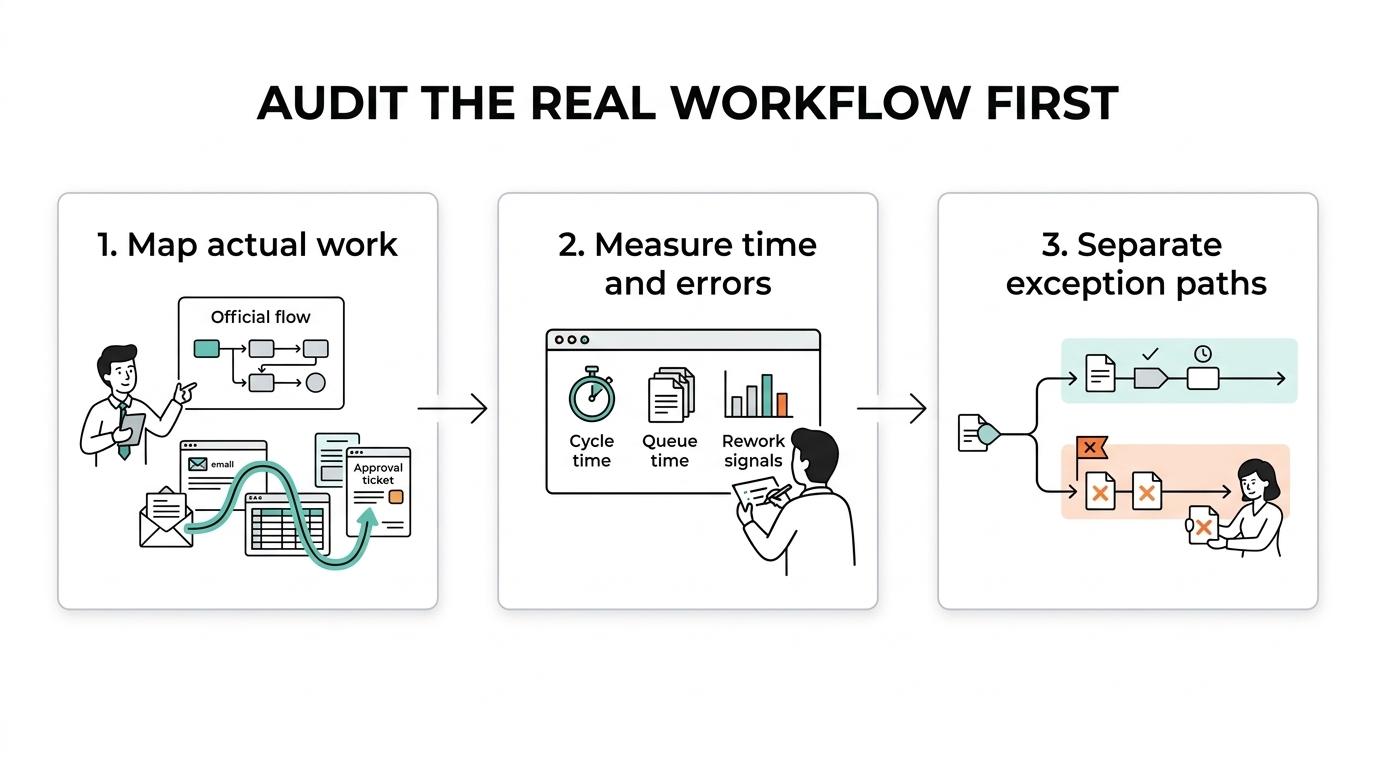
Step one is to map work as it is actually performed. Interview the people doing the work, review tickets and approvals, and compare the official flow to the lived one. This is where process mining or process intelligence can help because event logs often reveal loops, retries, and wait states that no one documented.
Step two is to baseline the current state. Measure cycle time, touch time, queue time, rework, error rate, and system downtime. APQC treats these as core process-efficiency signals because they let you compare before and after, rather than relying on anecdotal improvement claims.
Step three is to isolate exceptions. Pro tip: the exception path often decides whether automation succeeds. If 80% of work is rule-based but the remaining 20% is messy, you may automate most of the flow while routing special cases to people instead of forcing a brittle end-to-end robot.
Should you automate a bad process or redesign it first?
You should redesign a bad process before you automate it. Automation amplifies process logic, so unnecessary approvals and weak rules become faster versions of the same waste.
This is one of the biggest causes of disappointment in automation programs. McKinsey found broad adoption momentum, with two-thirds of respondents at least piloting automation in one or more functions, yet only 61% said their companies had met automation targets. One reason is simple: many organizations automate too early.
Compare the two paths. If you automate a flawed process, you may get short-term labor savings, but you keep complexity, policy clutter, and poor exception handling. If you simplify first, you reduce future maintenance, improve data quality, and make governance easier.
Deloitte also found that 52% of respondents saw inability to change business processes or ways of working as a hard barrier to end-to-end automation. That is your warning sign. If teams cannot remove redundant approvals, unify definitions, or agree on ownership, the technology will not rescue the process.
How do manual handoffs create hidden cost and delay?
Manual handoffs create delay because every transfer adds waiting time, error risk, and accountability gaps. APQC metrics like error rate and system downtime help you quantify the damage.
A handoff is not just a person passing a task to another person. It is every moment where work pauses for clarification, re-entry, attachment review, approval, or data validation. That means your process may look fine on a swimlane diagram while still underperforming in real life.
If a request changes systems five times, you should assume quality loss unless controls are very strong. Common mistake: teams measure only processing time and ignore queue time. In many approval-heavy processes, the actual work takes minutes while the waiting takes days.
"Branch has a regional delivery record dating back to 2015, which matters when automation work must hold up under real operating conditions in the UAE and Saudi Arabia."
Once you see handoffs clearly, you can decide whether to remove them, automate them, or convert them into tracked decision points with SLA ownership.
How can you prioritize automation opportunities in three steps?
You should prioritize business process automation by balancing business value, process stability, and implementation feasibility. High volume alone is not enough.
First, score value. Look at transaction volume, delay cost, customer impact, compliance exposure, and error frequency. A process that blocks invoicing, onboarding, case resolution, or regulatory response usually has stronger automation value than a low-volume back-office task.
Second, score feasibility. Deloitte reported that 62% of respondents cited integration difficulty as a top barrier, and 55% cited lack of skills and experience. So ask practical questions. Are the systems accessible? Is the data structured? How many exceptions exist? Who owns the rules?
Third, start with a bounded pilot that still proves the full workflow concept. That means real users, real approvals, and real downstream effects. Pro tip: a pilot should test the hardest dependency early, not avoid it. If integration is the real blocker, prove that path first.
Is business process automation the same as RPA or BPM?
No. Business process automation is the broader outcome, while RPA, BPM platforms, and AI are different ways to support it.
You will make better decisions if you separate the category from the tools. Business process automation is the redesign and execution of work across people, rules, and systems. Robotic process automation, or RPA, usually imitates user actions in existing interfaces. Business-process-management platforms coordinate workflows, approvals, rules, and audit trails. AI systems can classify documents, route cases, summarize inputs, or support decisions.
Here is the practical difference:
- Business process automation: end-to-end workflow change across systems and teams
- RPA: interface-level task execution for repetitive steps
- BPM platforms: modeled workflows, SLAs, rules, and governance
- AI systems: judgment support for unstructured or variable inputs
If your problem is isolated and rules-based, RPA may help quickly. If your problem spans departments, approvals, service levels, and reporting, BPM-style orchestration is often the stronger fit. If your inputs are documents, emails, or free text, AI may be useful, but only with good controls.
How do you measure whether automation is actually working?
You measure automation by comparing baseline process efficiency to post-launch performance. APQC recommends metrics like error rate, system downtime, forecast accuracy, and degree of automation because they show whether the process is truly better.
Start with the smallest useful scorecard. You do not need twenty KPIs. You need a baseline, a target, and a review rhythm that people will actually use. If you cannot compare pre-automation and post-automation performance, you do not have evidence. You have opinion.
A practical scorecard often includes:
- Cycle time: request to completion
- Error rate: rework, defect, or exception frequency
- System downtime: availability of the automated flow
- Degree of automation: share of work completed without manual touch
- SLA attainment: how often the process meets promised timing
Pro tip: measure exception handling separately. Many automation programs look successful in average cycle time while failing badly on edge cases, escalations, or cross-system reconciliations.
What does automation change in jobs, and what does it not change?
Automation usually changes tasks and process design more than it eliminates whole jobs. McKinsey estimated that fewer than 5% of occupations could be entirely automated with current technology, while about 60% could have 30% or more of their activities automated.
That distinction matters when you plan change. You are rarely removing an entire role. You are reducing repetitive, rules-based activities inside the role. That means job redefinition, not just tool deployment.
If you automate document routing, basic validations, or standard approvals, your team can spend more time on exception handling, customer judgment, partner coordination, and quality review. But that only works if you redesign responsibilities clearly. Common mistake: teams launch automation and leave ownership fuzzy, which creates duplicate checks and shadow work.
If then logic helps here. If the task is repetitive, structured, and high volume, automate more of it. If the task requires context, negotiation, or nuanced judgment, automate the surrounding steps and keep the decision with people.
When should you bring in a technology partner?
You should bring in a technology partner when automation spans architecture, workflow design, integration, testing, and post-launch support, especially if deadlines are fixed. Branch is built for that type of enterprise delivery, where engineering, design, and delivery need to move together.
The trigger is usually complexity, not size alone. A single process can justify outside help if it crosses multiple systems, requires auditability, or has no room for failure during launch. This is common in government, regulated enterprise, and public-facing service environments.
You should also look for outside support when your internal team can identify the problem but cannot get enough delivery capacity to fix it without slowing business operations. That is where a studio or implementation partner can add structure across architecture, workflow logic, testing discipline, and rollout planning.
A strong partner should help you see trade-offs clearly. If a tool is fast but brittle, you should hear that. If the process itself needs redesign before automation, you should hear that too. That kind of clarity saves time, budget, and executive patience.